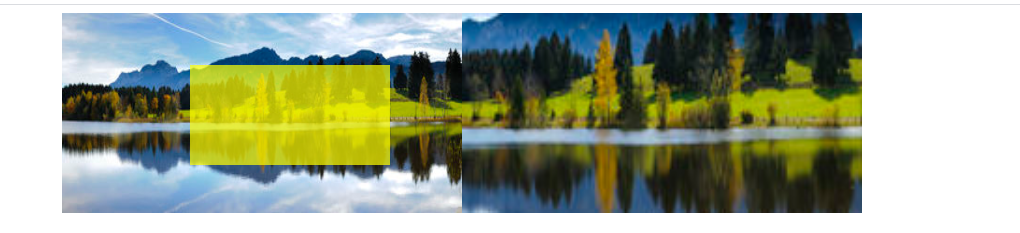
1
2
3
4
5
6
7
8
9
10
11
12
13
14
15
16
17
18
19
20
21
22
23
24
25
26
27
28
29
30
31
32
33
34
35
36
37
38
39
40
41
42
43
44
45
46
47
48
49
50
51
52
53
54
55
56
57
58
59
60
61
62
63
64
65
66
67
68
69
70
71
72
73
74
75
76
77
78
79
80
81
82
83
84
85
86
| <!DOCTYPE html>
<html>
<head>
<meta charset="utf-8">
<title></title>
<style type="text/css">
.fdj {
width: 800px;
height: 200px;
margin: 0 auto;
display: flex;
}
.left {
width: 400px;
height: 200px;
background-image: url(下载.jpg);
background-size: 100% 100%;
position: relative;
}
.zhezhao {
display: none;
width: 200px;
height: 100px;
background-color: rgba(255, 255, 0, 0.7);
position: absolute;
}
.right {
width: 400px;
height: 200px;
display: none;
background-image: url(下载.jpg);
/* background-size: 200% 200%; */
background-size: 800px 400px;
background-position: 0 0;
}
</style>
</head>
<body>
<div class="fdj">
<div class="left">
<div class="zhezhao"></div>
</div>
<div class="right"></div>
</div>
</body>
<script type="text/javascript">
var fdj = document.querySelector(".fdj");
var left = document.querySelector(".left");
var zhezhao = document.querySelector(".zhezhao");
var right = document.querySelector(".right");
//移入显示
left.onmouseenter = function() {
zhezhao.style.display = 'block';
right.style.display = "block";
}
//隐藏
left.onmouseleave = function() {
zhezhao.style.display = 'none';
}
//监听鼠标在left元素上移动
left.onmousemove = function(event) {
console.log(event);
var x = event.pageX - 100 - fdj.offsetLeft;
var y = event.pageY - 50 - fdj.offsetTop;
if (x < 0) {
x = 0;
}
if (x > 200) {
x = 200;
}
if (y < 0) {
y = 0;
}
if (y > 100) {
y = 100;
}
zhezhao.style.left = x + "px";
zhezhao.style.top = y + "px";
//两倍的移动
right.style.backgroundPosition = (-x * 2) + "px " + (-y * 2) + "px";
}
</script>
</html>
|